---
title: "Add/Edit News Item"
slug: "addedit-news-item"
description: "You can edit news items in SysAid, their description, insert time, and who they'll be presented to on the Add/Edit News Item page."
tags: ["SysAid Classic"]
updated: 2026-07-05T06:49:14Z
published: 2026-07-05T06:49:14Z
canonical: "documentation.sysaid.com/addedit-news-item"
---
> ## Documentation Index
> Fetch the complete documentation index at: https://documentation.sysaid.com/llms.txt
> Use this file to discover all available pages before exploring further.
# Add/Edit News Item
This page allows you to edit news items in SysAid.
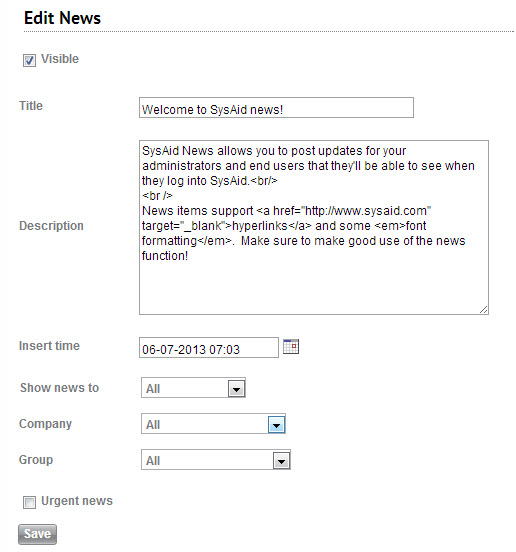
Fill out the following fields and then click **Save** to insert your news item.
#### Visible
Check this to enable the news item.
#### Title
This is the title of your news item.
#### Description
This is the content of the news item.
#### Insert time
This is the timestamp shown on the news item. The behavior of items with an insert time that's in the future varies according to where it's shown:
- **Announcements (Admin)**: The Admin side displays all published announcements, regardless of date.
- **Self-Service Portal News**: Only displays news items that are currently valid and published (e.g., dated in the past or present), and excludes future-dated items.
#### Show news to
Choose to show a news item to administrators, end users, or both.
#### Company
Choose to show a news item to one particular company or to all companies.
#### Group
Choose to show a news item to one user group or to all user groups.
#### Urgent news
If checked, the insert time of the news item will be highlighted in red, calling attention to the news item.
### HTML in news items
News items support various HTML commands and CSS styles. Supported HTML and CSS include:
-
(line break)
- [Hyperlink](http://www.sysaid.com/)
- **Bold**
- *Italics*
- Underline
- Color